
Advanced Prompt Engineering with AI Roles for Business Automation
Complete Guide with Roles for AI Content and Workflow Automation

Introduction to AI Tools Roles
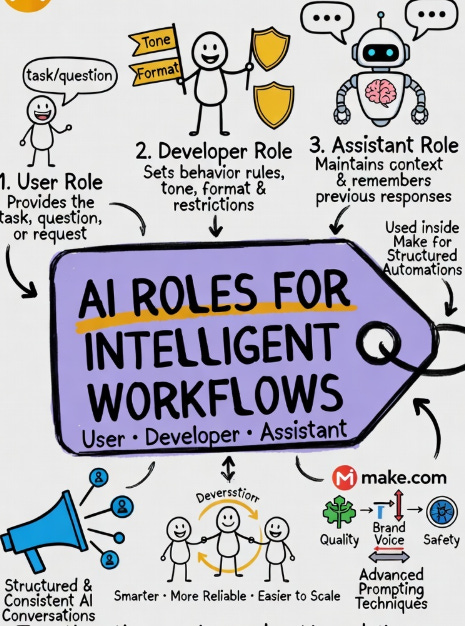
AI conversations work through different “roles.” Each role gives the AI context about who is speaking, what instructions matter, and how responses should be generated. These roles become especially powerful when building automations in platforms like Make.
1. What is the User Role?
The User Role contains the actual request, question, or task from the end user.
It tells the AI:
What problem needs solving
What output is expected
What context the user provides
Example
User says:
“Write a LinkedIn post about AI in education.”
Here, the AI focuses on fulfilling the user’s request.
2. Demo: User Role in Make
In Make, you can pass dynamic input from:
Forms
CRM systems
Databases
Emails
Example workflow:
A form captures a topic.
Make sends that topic as the User Role message.
ChatGPT generates the content.
Example payload:
User:
Create a blog title about prompt engineering.
3. What is the Developer Role?
The Developer Role controls how the AI should behave.
It defines:
Tone
Formatting
Restrictions
Business rules
Think of it as the “instruction layer.”
Example
Developer message:
Always respond in professional English, use headings, and avoid slang.
Now every user request follows these rules.
4. Demo: Developer Role in Make
Inside Make:
Add the OpenAI module.
Insert a Developer message before the User message.
Define behavior rules.
Example:
Developer:
Generate SEO-friendly content in article format under 500 words.
Then user input becomes structured automatically.
5. Advanced Developer Role Techniques
Advanced use cases include:
A. Persona Control
Example:
Act like a startup mentor.
B. Output Formatting
Example:
Return output as JSON.
C. Guardrails
Example:
Never provide medical or legal conclusions without disclaimers.
D. Brand Voice
Example:
Write in a style similar to Forbes business newsletters.
This keeps responses consistent across workflows.
6. What is the Assistant Role?
The Assistant Role stores previous AI responses in the conversation.
It helps the model:
Maintain context
Avoid repetition
Continue ongoing tasks
Example:
If the assistant already created a blog outline, it can continue writing section two without starting over.
7. Advanced Prompting Strategies with Assistant Role
Use Assistant Role for:
A. Memory Continuity
Continue previous drafts.
B. Multi-step Workflows
Example:
Assistant generates outline.
Assistant expands sections.
Assistant creates social posts.
C. Iterative Improvement
Example:
Improve the previous answer for clarity and SEO.
This creates smarter conversations.
8. Implementing Assistant Role in Make
In Make:
Store the AI response.
Pass that response back as an Assistant message.
Add a new User instruction.
Example:
Assistant:
Here is your article outline.
User:
Expand section 1 with examples.
This enables ongoing context-aware automation.
9. Conclusion and Final Thoughts
Using User + Developer + Assistant roles together creates reliable AI workflows.
User Role = What needs to be done
Developer Role = How it should be done
Assistant Role = What has already been done
When combined inside Make, these roles help build smarter content systems, customer support bots, and business automations.
— Mom AI Book