MCP (Model Context Protocol) is an open standard that allows AI assistants to securely connect with external tools, applications, databases, and services through a common interface.
Instead of building a separate integration for every AI model, developers create an MCP server once, and any MCP-compatible AI assistant can use it.
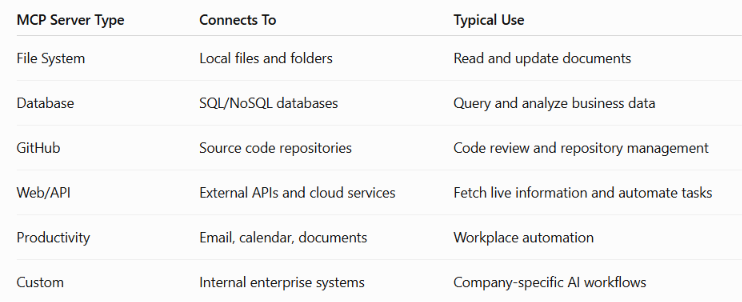
1. File System MCP Server
Provides access to files and folders.
Allows AI to read, write, search, and organize documents.
Example: An AI assistant finding a report in your Documents folder and updating it.
2. Database MCP Server
Connects AI to databases.
Allows querying, updating, and analyzing structured data.
Example: An AI assistant retrieving customer orders from a SQL database.
3. GitHub MCP Server
Gives AI access to GitHub repositories.
Allows reading code, reviewing pull requests, creating issues, and managing repositories.
Example: An AI assistant reviewing code changes and creating a pull request.
4. Web/API MCP Server
Connects AI to external APIs and online services.
Allows retrieving live information or interacting with cloud applications.
Example: An AI assistant checking today’s weather or sending a Slack message.
5. Productivity MCP Server
Integrates with workplace productivity tools.
Allows AI to manage calendars, emails, documents, and tasks.
Example: An AI assistant scheduling a meeting and sending invitations through Microsoft 365 or Google Workspace.
6. Custom MCP Server
Built specifically for an organization’s internal systems.
Allows AI to securely access proprietary applications and business workflows.
Example: A hospital’s MCP server allowing an AI assistant to retrieve patient appointments without exposing the entire hospital system.
If your AI assistant could securely connect to one tool using an MCP server, what would you choose—and how would it save you time every day?
How can we connect
AI Assistant
│
MCP Client
│
MCP Server
│
Tool or Service
(File System, GitHub, Database, Slack, etc.)
Step 1: Start an MCP Server:
npx ../server-filesystem C:\Projects
Step 2: Configure Your AI Client
In an MCP-compatible AI application (such as Claude Desktop or another MCP client), add the server configuration.
Step 3: Restart the AI Appl.
After restarting, the AI detects the MCP server automatically.
Step 4: Start Asking Questions